Voice Intros Sound Distorted or Crackly on iOS 27
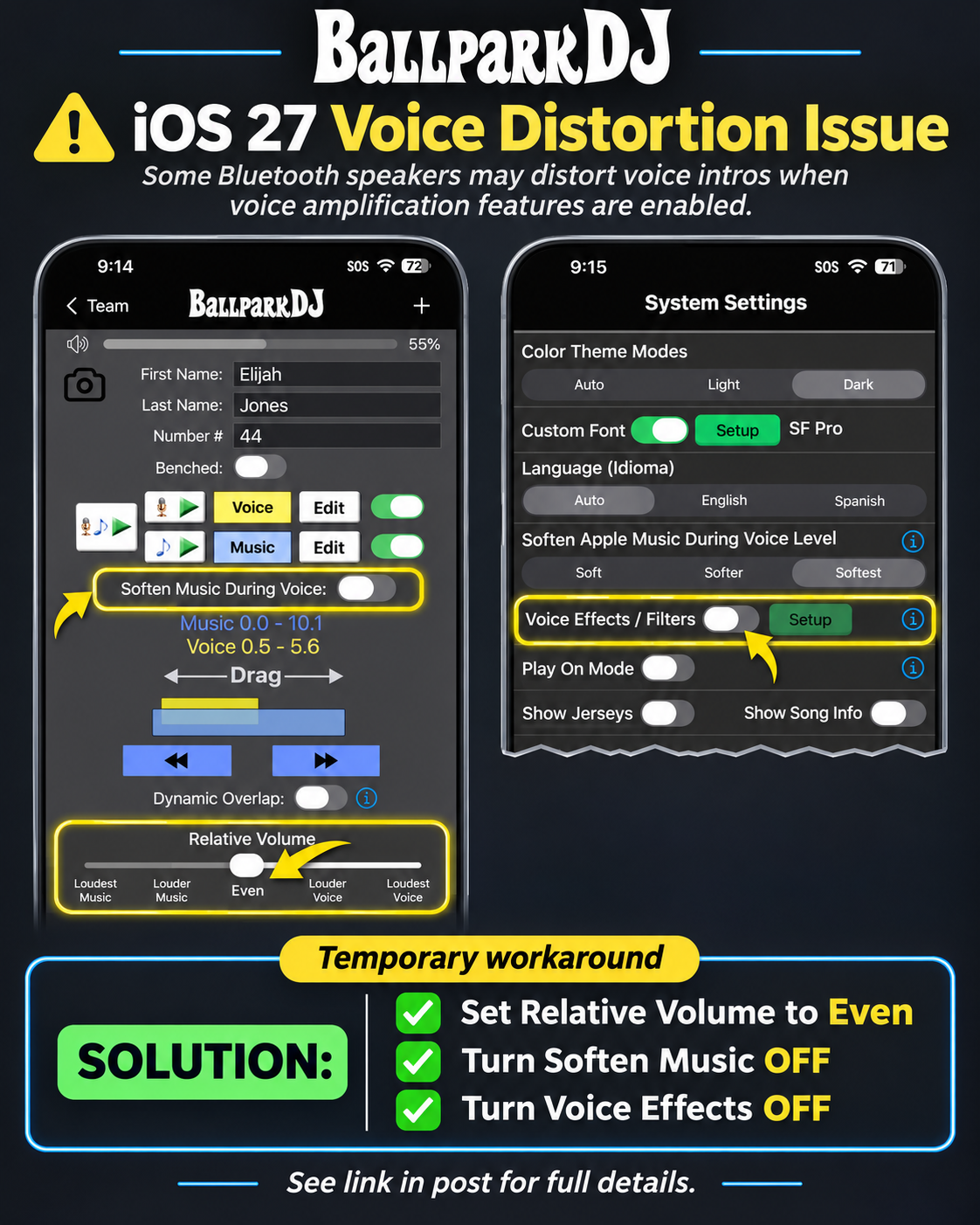
🔊 iOS 27 Bluetooth Speaker Audio Issue — Temporary Fix
We're investigating an audio issue affecting some BallparkDJ users running iOS 27 or later.
The issue can cause professional announcer voices to sound distorted, crackly, or difficult to understand when played through certain Bluetooth speakers.
When does this happen?
The issue appears to occur when all three conditions are present:
Your iPhone is running iOS 27 or later.
You're using certain Bluetooth speakers, including some JBL and TurtleBox models.
BallparkDJ's voice amplification features are enabled, including Louder Voice, Soften Music, or Voice Effects.
Not all Bluetooth speakers are affected, and playback through the iPhone's built-in speaker appears to work normally.
✅ Temporary Fix
If you're experiencing distorted announcer voices, please adjust these three settings in BallparkDJ:
Relative Volume: Set to Even
Soften Music: Turn OFF
Voice Effects: Turn OFF (including Gain). Make sure it’s OFF in both System Settings and Team Settings.
These settings avoid the voice amplification processing that appears to trigger the issue and should restore clear announcer playback on affected speakers.
Is This Issue Affecting Other Apps?
Similar audio distortion issues have also been reported by users of other apps, including Spotify, following updates to iOS 27. In particular, Spotify users have reported distorted Bluetooth audio when using equalizer settings that amplify certain frequencies.
These similarities suggest the issue may be related to changes in how iOS 27 handles amplified audio through certain Bluetooth devices, although the exact cause has not yet been confirmed.
You can read more about these reports in the Spotify Community discussion.
We're Working on It!
Our team is actively investigating this issue, which appears to be related to changes in iOS 27's audio handling.
We apologize for the inconvenience and appreciate your patience as we work toward a permanent solution.
— The BallparkDJ Team